Here’s a quick library to write your GPU-based operators and execute them in your Nvidia, AMD, Intel or whatever, along with my new VisualDML tool to design your operators visually. This is a follow up into my older DirectML article.
- The DMLLib source is available here.
- VisualDML source and download is available here. Windows Store download here. Auto updating x64 executable here.
The Linear Regression example
auto LinearRegressionCPU(float* px, float* py, size_t n)
{
    // Sx
    float Sx = 0, Sy = 0, Sxy = 0, Sx2 = 0;
    for (size_t i = 0; i < n; i++)
    {
        Sx += px[i];
        Sx2 += px[i] * px[i];
        Sy += py[i];
        Sxy += px[i] * py[i];
    }
    float B = (n * Sxy - Sx * Sy) / ((n * Sx2) - (Sx * Sx));
    float A = (Sy - (B * Sx)) / n;

    printf("Linear Regression CPU:\r\nSx = %f\r\nSy = %f\r\nSxy = %f\r\nSx2 = %f\r\nA = %f\r\nB = %f\r\n\r\n", Sx, Sy, Sxy, Sx2, A, B);
    return std::tuple(A, B);
}
Doing that with DirectML is a real pain, but here’s my library, easing the thing:
void LinearRegressionDML(float* px, float* py, unsigned int n)
{
 ML ml(true);
 ml.SetFeatureLevel(DML_FEATURE_LEVEL_6_4);
 auto hr = ml.On();

 MLOP op1(&ml);
 // Input X [0]
 op1.AddInput({ DML_TENSOR_DATA_TYPE_FLOAT32, { 1,n} });
 // Input Y [1]
 op1.AddInput({ DML_TENSOR_DATA_TYPE_FLOAT32, { 1,n} });
 // Constant n [2]
 op1.AddIntermediate(ml.ConstantValueTensor(*op1.GetGraph().get(), (float)n, { 1,1 }));
 // Sx [3]
 op1.AddIntermediate(dml::Slice(dml::CumulativeSummation(op1.Item(0), 1, DML_AXIS_DIRECTION_INCREASING, false), { 0, n - 1 }, { 1, 1 }, { 1, 1 }));
 // Sy [4]
 op1.AddIntermediate(dml::Slice(dml::CumulativeSummation(op1.Item(1), 1, DML_AXIS_DIRECTION_INCREASING, false), { 0, n - 1 }, { 1, 1 }, { 1, 1 }));
 // Sxy [5]
 op1.AddIntermediate(dml::Slice(dml::CumulativeSummation(dml::Multiply(op1.Item(0), op1.Item(1)), 1, DML_AXIS_DIRECTION_INCREASING, false), { 0, n - 1 }, { 1, 1 }, { 1, 1 }));
 // Sx2 [6]
 op1.AddIntermediate(dml::Slice(dml::CumulativeSummation(dml::Multiply(op1.Item(0), op1.Item(0)), 1, DML_AXIS_DIRECTION_INCREASING, false), { 0, n - 1 }, { 1, 1 }, { 1, 1 }));
 // float B = (n * Sxy - Sx * Sy) / ((n * Sx2) - (Sx * Sx));
 // B [7]
 op1.AddOutput((
   dml::Divide(
    dml::Subtract(
     dml::Multiply(
      op1.Item(2),
      op1.Item(5)
      ),
     dml::Multiply(
      op1.Item(3),
      op1.Item(4)
     )
    ),
   dml::Subtract(
    dml::Multiply(
     op1.Item(2),
     op1.Item(6)
     ),
    dml::Multiply(
    op1.Item(3),
    op1.Item(3)
    )
   )
  )
 ));

// float A = (Sy - (B * Sx)) / n; [8]
op1.AddOutput(dml::Divide(
 dml::Subtract(
  op1.Item(4),
  dml::Multiply(
   op1.Item(7),
   op1.Item(3)
   )
  ),
 op1.Item(2)
 ));

ml.ops.push_back(op1.Build());

 ml.Prepare();
 ml.ops[0].Item(0).buffer->Upload(&ml, px, n * sizeof(float));
 ml.ops[0].Item(1).buffer->Upload(&ml, py, n * sizeof(float));

 ml.Run();

 std::vector cdata;
 float A = 0, B = 0;
 ml.ops[0].Item(7).buffer->Download(&ml, (size_t)-1, cdata);
 memcpy(&B, cdata.data(), 4);
 ml.ops[0].Item(8).buffer->Download(&ml, (size_t)-1, cdata);
 memcpy(&A, cdata.data(), 4);

 printf("Linear Regression GPU:\r\nA = %f\r\nB = %f\r\n\r\n", A, B);
}
Okay now let's explain the above code. DirectML defines "operators" like in C++ that execute in GPU. A DML operator is a combination of other operators, for example y = sin(exp(add(x1,x2)) x1 and x2 are tensors (a generalization of matrixes) that we can use to apply the operator simultaneously. In DML library, every call to AddInput, AddOutput or AddIntermediate resolves to AddItem():
MLOP& MLOP::AddItem(dml::Expression expr, LPARAM tag, bool NewBuffer, BINDING_MODE Binding, std::optional bds, uint32_t nit)
- The expr parameter is a DML expression. We use the DirectMLX header only library to add an operator such as dml::Add. All the DirectML structures supported are here.
- The tag parameter is a unique LPARAM used to reference later the operator we are adding
- The NewBuffer indicates, if true, that this operator is to allocate new memory. The call to AddInput for example sets this to true by default. For operators that can reuse existing memory, this can be false. For example you may have two inputs that share the same matrix to operate on, in which case the first operator will create a new buffer and the second operator will reuse the existing buffer.
- The BINDING_MODE specifies the visibility of the operator’s memory to the CPU. Setting it to BINDING_MODE::BIND_IN (for example the input buffers) or BINDING_MODE::BIND_OUT for the output buffer allows us to get or set the memory of the operator from the CPU.
- The bds parameter allows us to reuse an existing memory, previously allocated with another operator, with this operator.
After creating our operators, we can upload data to the operators that have buffers, for example
ml.Prepare();
ml.ops[0].Item(0).buffer->Upload(&ml, px, n * sizeof(float));
This takes our first’ operators first’ item (the input, we can reference it also with the Tag) and uploads the data to the GPU.
ml.Run();
This “runs” the operators.
std::vector cdata;
ml.ops[0].Item(7).buffer->Download(&ml, (size_t)-1, cdata);
The “Download” member function allows us to “download” the data back to the CPU. The library automatically calls the Direct3D functions, binds buffers and creates DirectML transitions transparently.
The MNIST example
Using the library we can make the code easier when the example is more complex. For example, for the MNIST forward propagation:
Matrix NN::ForwardPropagation(Matrix input)
{
 // First layer, put the inputs as flattened
 Layers[0].output = input.flatten();

 // Next layers, forward
 for (size_t i = 1; i < Layers.size(); i++)
 {
  auto& current = Layers[i];
  auto& prev = Layers[i - 1];
  if (prev.output.cols() != current.weights.rows())
   current.output = (prev.output.flatten() * current.weights);
  else
   current.output = (prev.output * current.weights);
  current.output += current.biases;
  current.output.relu();
 }
return  Layers.back().output;
}
This (pseudo)code performs a typical forward propagation of the input layer of a mnist dataset to the output later. Essentially it calculates each layer’s output by multiplying the previous output with the weights and adding biases, then applying the relu():
for (size_t i = 0; i < _data.size(); i++)
{
  _data[i] = std::max(0.0f, _data[i]);
}
This is CPU all right. Now let’s see my implementation of that calculation in DirectML with my library with batch support:
std::optional NN::GetFPO(ML& ml, unsigned int batch, std::vector& data)
{
    MLOP op(&ml);
    if (data.size() == 0)
        return {};

    // Input data
    op.AddInput({ DML_TENSOR_DATA_TYPE_FLOAT32, { batch,1,1,(unsigned int)data[0].input.cols() * data[0].input.rows()} },1);

    // Weights and biases
    for (size_t i = 1; i < Layers.size() && Layers.size() >= 3; i++)
    {
        auto& layer = Layers[i];
        op.AddInput({ DML_TENSOR_DATA_TYPE_FLOAT32, { 1,1,(unsigned int)layer.weights.rows(),(unsigned int)layer.weights.cols()} },ltag(i, MODE_TAGS::WEIGHTS));
        op.AddInput({ DML_TENSOR_DATA_TYPE_FLOAT32, { 1,1,1,(unsigned int)layer.biases.cols()} }, ltag(i, MODE_TAGS::BIASES));
    }

    // Forward Propagation
    for (int i = 0; i < Layers.size(); i++)
    {
        auto& cl = Layers[i];
        if (i == 0) // input layer -> first hidden
        {
            op.AddOutput(dml::Identity(op.Item(0)), ltag(i, MODE_TAGS::OUTPUT));
        }
        else
        {
            auto& outl = op.WithTag(ltag(i - 1, MODE_TAGS::OUTPUT));

            std::vector batchOutputs;
            for (unsigned int b = 0; b < batch; ++b)
            {
                // Extract the b-th sample from the batch
                auto singleInput = dml::Slice(outl, {b, 0, 0, 0}, {1, 1, 1, outl.expr.GetOutputDesc().sizes[3]}, {1, 1, 1, 1});

                // Perform forward propagation for this single sample
                auto mul1 = dml::Gemm(singleInput, op.WithTag(ltag(i, MODE_TAGS::WEIGHTS)));
                auto add1 = dml::Add(mul1, op.WithTag(ltag(i, MODE_TAGS::BIASES)));
                auto output = dml::ActivationRelu(add1);
                batchOutputs.push_back(output);
            }

            if (batch == 1)
                op.AddOutput(batchOutputs[0], ltag(i, MODE_TAGS::OUTPUT));
            else
                op.AddOutput(dml::Join(batchOutputs, 0), ltag(i, MODE_TAGS::OUTPUT));
        }
    }

    op.Build();
    return op;
}
Now this is the same implementation as above and I use the dml:: operators to do the same multiplication and addition. "Running" this operator will execute the "forward propagation" into the GPU.
For backward propagation the CPU code is like this:
void NN::BackPropagation(Matrix label)
{
    auto OurOutput = Layers.back().output; // 1x10

    // Calculation of the derivation of MSE, 2 is ignored for simplicity because it doesn't affect gradient descent
    auto delta = OurOutput - label; // 1x10
    for (int i = (int)(Layers.size() - 1); i > 0; i--)
    {
        Layer& curr = Layers[i];
        Layer& prev = Layers[i - 1];

        // biased += σ'(z) , delta = 1x10,
        curr.biases += delta * ((float)-curr.lr);

        // weights += prev.Y.T * σ'(z)
        Matrix gradient = (prev.output.transpose() * delta); // 128x10, 784x128

        float clip_value = 5.0f;
        for (auto& value : gradient.data()) {
            value = std::max(-clip_value, std::min(value, clip_value));
        }
        curr.weights += gradient * ((float)-curr.lr);


        // σ'(z) = σ(z) * (1 - σ(z))

        // Sigmoid Derivative
        Matrix der = prev.output; // 1x128, 1x784
            der.sigmoid_derivative();

        // delta = (delta * prev.W.T) x σ'(z);
        // This multiplication implements the chain rule, combining the loss gradient with the derivative of the activation function for each layer.
        if (i > 1) // don't calculate for the first layer
        {
            auto fd = (delta * curr.weights.transpose());
#ifdef CLIP_DEBUG
            //				MatrixToClipboard(fd);
#endif

            delta = fd.multiply_inplace(der); // 1x128 second time
        }

    }
The backpropagation code is of course more complex, but it’s a few C++ CPU lines anyway. It implements the chain rule to calculate the derivatives and update the weights and the biases of the hidden and output layer.
Now it’s a bit harder in GPU but with a bit of patience you will work it out step by step:
std::optional NN::GetBPO(ML& ml, unsigned int batch, [[maybe_unused]] std::vector& data, MLOP& fpo)
{
    MLOP op(&ml);

    // Input Tensor
    auto& output_layer_outputs = fpo.WithTag(ltag(Layers.size() - 1, MODE_TAGS::OUTPUT));
    op.AddInput({ DML_TENSOR_DATA_TYPE_FLOAT32, output_layer_outputs.expr.GetOutputDesc().sizes },1,false, BINDING_MODE::BIND_IN, output_layer_outputs.buffer->b);

    // Label
    op.AddInput({ DML_TENSOR_DATA_TYPE_FLOAT32, {batch,1,1,10} },2);

    // Delta Loop
    dml::Expression T_DeltaFull = op.WithTag(1).expr - op.WithTag(2).expr;

    std::vector batchGradients(Layers.size());
    std::vector batchDeltas(Layers.size());

    // Pass 1: Create input tensors
    for (int i = (int)(Layers.size() - 1); i >= 0; i--)
    {
        if (i == 0)
            break;

        auto& prev_outputs = fpo.WithTag(ltag(i - 1, MODE_TAGS::OUTPUT));
        auto& curr_biases = fpo.WithTag(ltag(i, MODE_TAGS::BIASES));
        auto& curr_weights = fpo.WithTag(ltag(i, MODE_TAGS::WEIGHTS));

        if (op.WithTag2(ltag(i - 1, MODE_TAGS::OUTPUTBP)) == 0)
            op.AddInput({ DML_TENSOR_DATA_TYPE_FLOAT32, prev_outputs.expr.GetOutputDesc().sizes },ltag(i - 1,MODE_TAGS::OUTPUTBP),false,BINDING_MODE::BIND_IN, prev_outputs.buffer->b);
        if (op.WithTag2(ltag(i, MODE_TAGS::BIASESBP)) == 0)
            op.AddInput({ DML_TENSOR_DATA_TYPE_FLOAT32, curr_biases.expr.GetOutputDesc().sizes },ltag(i,MODE_TAGS::BIASESBP), false, BINDING_MODE::BIND_IN, curr_biases.buffer->b);
        if (op.WithTag2(ltag(i, MODE_TAGS::WEIGHTSBP)) == 0)
            op.AddInput({ DML_TENSOR_DATA_TYPE_FLOAT32, curr_weights.expr.GetOutputDesc().sizes }, ltag(i, MODE_TAGS::WEIGHTSBP), false, BINDING_MODE::BIND_IN, curr_weights.buffer->b);
    }


    for (unsigned int iBatch = 0; iBatch < batch; iBatch++)
    {
        auto T_Delta1 = (batch == 1) ? T_DeltaFull : dml::Slice(T_DeltaFull, { iBatch, 0, 0, 0 }, { 1, 1, T_DeltaFull.GetOutputDesc().sizes[2], T_DeltaFull.GetOutputDesc().sizes[3] }, { 1, 1, 1, 1 });


        // Pass 1: Calculate gradients
        for (int i = (int)(Layers.size() - 1); i >= 0; i--)
        {
            if (i == 0)
            {
                if (batchDeltas[i].Impl() == 0)
                    batchDeltas[i] = T_Delta1;
                else
                    batchDeltas[i] = batchDeltas[i] + T_Delta1;
                break;
            }
            Layer& prev = Layers[i - 1];
            // Matrix gradient = (prev.output.transpose() * delta); // 128x10, 784x128

            auto& prev_outputs = op.WithTag(ltag(i - 1, MODE_TAGS::OUTPUTBP));
            auto& curr_weights = op.WithTag(ltag(i, MODE_TAGS::WEIGHTSBP));

            auto PrevO = (batch == 1) ? prev_outputs : dml::Slice(prev_outputs, { iBatch, 0, 0, 0 }, { 1, 1, prev_outputs.expr.GetOutputDesc().sizes[2], prev_outputs.expr.GetOutputDesc().sizes[3] }, { 1, 1, 1, 1 });
            auto bp_gradientunclipped = dml::Gemm(PrevO, T_Delta1, {}, DML_MATRIX_TRANSFORM_TRANSPOSE, DML_MATRIX_TRANSFORM_NONE); // 128x10, 784x128 for MNIST
            // Clip the gradient
            // float clip_value = 5.0f; 				for (auto& value : gradient.data()) { 						value = std::max(-clip_value, std::min(value, clip_value)); }
            auto bp_clippedgradient = dml::Clip(bp_gradientunclipped, -5.0f, 5.0f);

            if (batchGradients[i].Impl() == 0)
                batchGradients[i] = bp_clippedgradient;
            else
                batchGradients[i] = batchGradients[i] + bp_clippedgradient;


            // And the derivative
            auto bp_der1 = dml::Identity(PrevO);

            dml::Expression bp_der2;
            if (prev.ActType == ACT_TYPE::SIGMOID)
            {
                // Sigmoid Derivative
                auto bp_dx = dml::ActivationSigmoid(bp_der1);
                auto bp_one1 = ml.ConstantValueTensor(*op.graph, 1.0f, bp_dx.GetOutputDesc().sizes);
                auto bp_oneMinusSigmoid = bp_one1 - bp_dx;
                bp_der2 = bp_dx * bp_oneMinusSigmoid;
            }
            if (prev.ActType == ACT_TYPE::IDENTITY)
            {
                // Idenity derivative
                bp_der2 = ml.ConstantValueTensor(*op.graph, 1.0f, bp_der1.GetOutputDesc().sizes);
            }
            if (prev.ActType == ACT_TYPE::RELU)
            {
                // Relu derivative
                auto bp_dx = dml::ActivationRelu(bp_der1);
                auto bp_zeroTensor = ml.ConstantValueTensor(*op.graph, 0.0f, bp_dx.GetOutputDesc().sizes);
                auto bp_reluMask = dml::GreaterThan(bp_dx, bp_zeroTensor);
                bp_der2 = dml::Cast(bp_reluMask, DML_TENSOR_DATA_TYPE_FLOAT32);
            }

            auto bp_Delta2 = dml::Gemm(T_Delta1, curr_weights, {}, DML_MATRIX_TRANSFORM_NONE, DML_MATRIX_TRANSFORM_TRANSPOSE);
            auto T_Delta2 = bp_Delta2 * bp_der2;
            if (batchDeltas[i].Impl() == 0)
                batchDeltas[i] = T_Delta1;
            else
                batchDeltas[i] = batchDeltas[i] + T_Delta1;
            T_Delta1 = T_Delta2;

        }
    }


    // Accumulate gradients
    if (batch > 1)
    {
        for (int i = 1; i < Layers.size(); i++) {
            batchGradients[i] = batchGradients[i] * (1.0f / batch);
        }
    }
    // and deltas
    if (batch > 1)
    {
        for (int i = 1; i < Layers.size(); i++) {
            batchDeltas[i] = batchDeltas[i] * (1.0f / batch);
        }
    }


    // Phase 2 : Update Biases / Weights
    for (int i = (int)(Layers.size() - 1); i >= 0; i--)
    {
        Layer& curr = Layers[i];
        auto T_Delta1 = batchDeltas[i];

        if (i == 0)
        {
            op.AddOutput(dml::Identity(T_Delta1), 3);
            break;
        }

        // 	curr.biases += delta * ((float)-curr.lr);
        auto bp_mincurrlr = ml.ConstantValueTensor(*op.graph, (float)-curr.lr, T_Delta1.GetOutputDesc().sizes);
        auto bp_mul2 = T_Delta1 * bp_mincurrlr;

        auto& curr_biases = fpo.WithTag(ltag(i, MODE_TAGS::BIASES));
        auto& curr_weights = fpo.WithTag(ltag(i, MODE_TAGS::WEIGHTS));
        if (op.WithTag2(ltag(i,MODE_TAGS::BIASESBP)) == 0)
            op.AddInput({ DML_TENSOR_DATA_TYPE_FLOAT32, curr_biases.expr.GetOutputDesc().sizes }, ltag(i, MODE_TAGS::BIASESBP), false, BINDING_MODE::BIND_IN, curr_biases.buffer->b);

        op.AddOutput(op.WithTag(ltag(i,MODE_TAGS::BIASESBP)) + bp_mul2, ltag(i, MODE_TAGS::BIASESBPOUT));

        // curr.weights += gradient * ((float)-curr.lr);
        auto bp_mincurrlr2 = ml.ConstantValueTensor(*op.graph, (float)-curr.lr, batchGradients[i].GetOutputDesc().sizes);
        auto bp_mul3 = batchGradients[i] * bp_mincurrlr2;

        if (op.WithTag2(ltag(i, MODE_TAGS::WEIGHTSBP)) == 0)
            op.AddInput({ DML_TENSOR_DATA_TYPE_FLOAT32,curr_weights.expr.GetOutputDesc().sizes }, ltag(i, MODE_TAGS::WEIGHTSBP), false, BINDING_MODE::BIND_IN, curr_weights.buffer->b);

        op.AddOutput(op.WithTag(ltag(i, MODE_TAGS::WEIGHTSBP)) + bp_mul3, ltag(i, MODE_TAGS::WEIGHTSBPOUT));
    }


    op.Build();
    return op;
}
Note that we pass the FP operator because we are going to reuse it’s buffers. At the end, we get the output buffers of the updated weights and biases which we need to put back to the forward operator’s memory.
Finally, in the Visual DMLS code sample, we got a full “dmltrain” function which trains the MNIST datsset using these two operators.
VisualDML
The idea is to design your operators visually, with a graph.
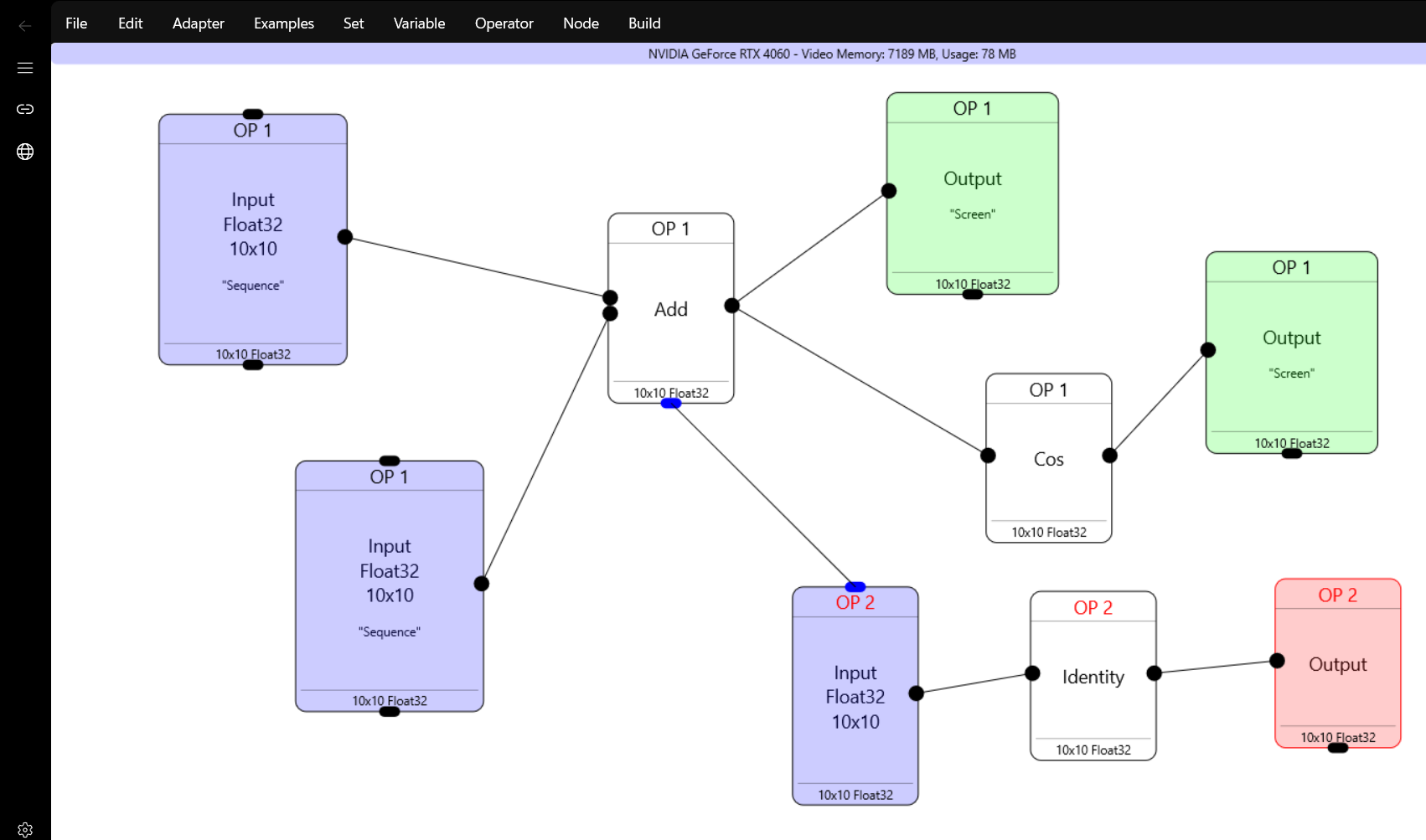
Here we have two operators. The first one has two inputs , an “add” operator which sends to one screen output, and one cos operator which in turn goes to another screen output. For easier debugging I ‘ve put “Sequencer” and “Random” inputs to the input tensors, which in this ase are 10×10.
Running the first operator gets us two message boxes
0.000000 0.020000 0.040000 0.060000 0.080000 0.100000 0.120000 0.140000 0.160000 0.180000 0.200000 0.220000 0.240000 0.260000 0.280000 0.300000 0.320000 0.340000 0.360000 0.380000 0.400000 0.420000 0.440000 0.460000 0.480000 0.500000 0.520000 0.540000 0.560000 0.580000 0.600000 0.620000 0.640000 0.660000 0.680000 0.700000 0.720000 0.740000 0.760000 0.780000 0.800000 0.820000 0.840000 0.860000 0.880000 0.900000 0.920000 0.940000 0.960000 0.980000 1.000000 1.020000 1.040000 1.060000 1.080000 1.100000 1.120000 1.140000 1.159999 1.179999 1.199999 1.219999 1.239999 1.259999 1.279999 1.299999 1.319999 1.339999 1.359999 1.379999 1.399999 1.419999 1.439999 1.459999 1.479999 1.499999 1.519999 1.539999 1.559999 1.579999 1.599999 1.619999 1.639999 1.659999 1.679999 1.699999 1.719999 1.739999 1.759999 1.779999 1.799999 1.819999 1.839999 1.859999 1.879999 1.899999 1.919999 1.939999 1.959999 1.979999
1.000000 0.999800 0.999200 0.998200 0.996802 0.995004 0.992809 0.990216 0.987227 0.983844 0.980067 0.975897 0.971338 0.966390 0.961055 0.955336 0.949235 0.942755 0.935897 0.928665 0.921061 0.913089 0.904752 0.896052 0.886995 0.877582 0.867819 0.857709 0.847255 0.836463 0.825336 0.813878 0.802096 0.789992 0.777573 0.764842 0.751806 0.738469 0.724836 0.710914 0.696707 0.682221 0.667463 0.652438 0.637151 0.621610 0.605820 0.589788 0.573520 0.557023 0.540303 0.523366 0.506221 0.488872 0.471329 0.453597 0.435683 0.417595 0.399340 0.380925 0.362358 0.343646 0.324797 0.305817 0.286716 0.267499 0.248176 0.228753 0.209239 0.189641 0.169968 0.150226 0.130425 0.110570 0.090672 0.070738 0.050775 0.030792 0.010797 -0.009202 -0.029198 -0.049183 -0.069147 -0.089084 -0.108985 -0.128843 -0.148649 -0.168396 -0.188075 -0.207680 -0.227201 -0.246631 -0.265963 -0.285188 -0.304299 -0.323288 -0.342148 -0.360872 -0.379450 -0.397878
Now we have another operator also which takes it’s input from the “Add” operator in Operator 1, sends it to Identify operator and to screen.
Pressing F7 “compiles” the operators and F5 “runs” them.
The most important feature in VisualDML is that with F9 and Shift+F9 it can produce C++ code or generate a VS solution.
For the above graph, the C++ code is this:
#include "pch.h"
#include "dmllib.hpp"

int main()
{
    // Initialize DirectML via the DMLLib
    CoInitializeEx(NULL, COINIT_MULTITHREADED);
    ML ml(true);
    ml.SetFeatureLevel(DML_FEATURE_LEVEL_6_4);
    auto hr = ml.On();
    if (FAILED(hr))
        return 0;


    if (1)
    {
        MLOP mop(&ml);
        mop.AddInput({ DML_TENSOR_DATA_TYPE_FLOAT32, {10,10} }, 0, true, BINDING_MODE::BIND_IN,{});
        mop.AddInput({ DML_TENSOR_DATA_TYPE_FLOAT32, {10,10} }, 0, true, BINDING_MODE::BIND_IN,{});
        mop.AddItem(dml::Add(mop.Item(0),mop.Item(1)));
        mop.AddItem(dml::Cos(mop.Item(2)));
        mop.AddOutput(mop.Item(2));
        mop.AddOutput(mop.Item(3));
        ml.ops.push_back(mop.Build());
    }


    if (1)
    {
        MLOP mop(&ml);
        mop.AddInput({ DML_TENSOR_DATA_TYPE_FLOAT32, {10,10} }, 0, false, BINDING_MODE::BIND_IN,ml.ops[0].Item(2).buffer->b);
        mop.AddItem(dml::Identity(mop.Item(0)));
        mop.AddOutput(mop.Item(1));
        ml.ops.push_back(mop.Build());
    }


    // Initialize
    ml.Prepare();

    // Upload data example
    // std::vector data(100);
    // ml.ops[0].Item(0).buffer->Upload(&ml, data.data(), data.size() * sizeof(float));

    // Run the operators
    ml.Run();

    // Download data example
    // std::vector cdata;
    // ml.ops[0].Item[ml.ops[0].Item.size() - 1].buffer->Download(&ml, 400, cdata);

}
VisualDML features
- Save/Load project
- Pick the GPU adapter to use if you have many.
- Support variables in DML expressions which can be read and written by the DML operators
- Export C++ code and VS solution on the graph
- Right click support of almost all DirectML operators, comparison operations and all activation functions.
- Neural Network Design (with ready to be used MNIST) which implements a simple NN using DMLLib.
- Export the NN results in ONNX or PTH if you have Python installed.
Have fun!